Tips for Creating a Productive Home Office Space
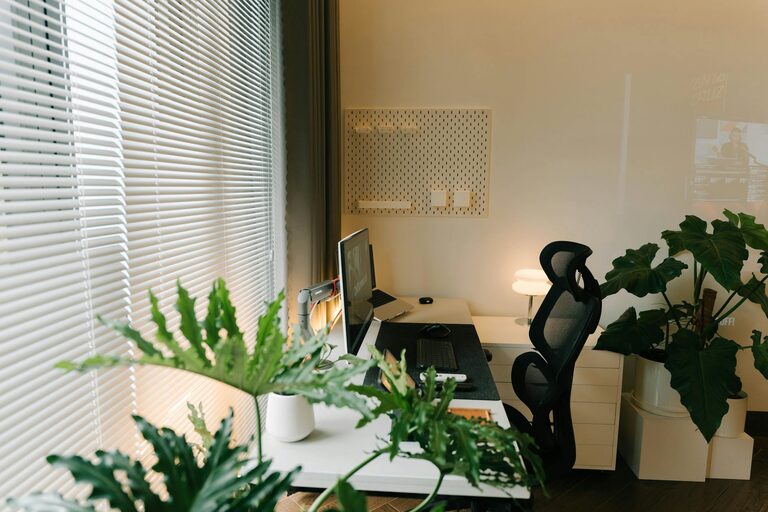
Creating a productive home office space is essential for anyone working remotely or studying at home. When your workspace is comfortable, organised, and tailored to your needs, it can make a significant difference to your focus and efficiency. This guide offers practical tips to help you set up a home office that not only looks good but also supports your productivity.
Choose the Right Location
The first step in creating a productive home office is selecting a suitable area in your home. Ideally, this should be a quiet spot with minimal distractions. Here are a few considerations:
– Natural Light: Try to position your desk near a window. Natural light can improve mood and reduce eye strain.
– Privacy: Choose a space where you can close a door or create a sense of separation from busy household activities.
– Space: Ensure there’s enough room for your desk, chair, and any equipment or storage you need.
If space is limited, consider using fold-away desks or creating a compact workstation that can be tidied up easily.
Invest in Comfortable and Functional Furniture
Comfort plays a crucial role in productivity. Sit in a chair that supports good posture and allows your feet to rest flat on the floor. Here are some tips regarding furniture:
– Ergonomic Chair: Look for adjustable chairs that support your lower back.
– Desk Height: Your desk should be at a height where your arms rest comfortably at about a 90-degree angle.
– Storage Solutions: Use shelves, drawers, or filing cabinets to keep documents and office supplies organised and out of sight.
Comfortable furniture helps reduce fatigue and the risk of aches, letting you work longer and more comfortably.
Prioritise Organisation and Decluttering
A cluttered workspace can lead to distractions and stress. Maintaining an orderly home office helps keep your mind clear and tasks manageable.
– Cable Management: Use clips or cable organisers to keep cords tidy and prevent tangling.
– Desk Essentials: Keep only what you use daily on your desk; store other items away.
– Daily Tidy-Up: Spend a few minutes at the end of each day clearing surfaces and putting things in their place.
Using labels and colour-coded systems can also make recalling documents and supplies easier.
Optimise Lighting for Work
Good lighting reduces eye strain and keeps you alert. Here’s how to set up your lighting effectively:
– Use Natural Light: As mentioned, position your desk near a window.
– Task Lighting: Add a desk lamp with adjustable brightness to illuminate work materials without casting shadows.
– Avoid Glare: Position screens and light sources to prevent glare on your computer monitor.
Choosing bulbs with a daylight tone (around 5000K) can help maintain alertness during longer working hours.
Minimise Distractions
Creating boundaries helps you focus better during work hours:
– Set Clear Hours: Define your working schedule and communicate it to the people in your household.
– Use Headphones: Noise-cancelling headphones can block background noise and improve concentration.
– Limit Phone Interruptions: Silence personal phone notifications during work periods or use ‘Do Not Disturb’ mode.
Organising your space away from noisy appliances or communal areas can further reduce distractions.
Personalise Your Space Thoughtfully
A personal touch can make the workspace more inviting without overwhelming it:
– Add Plants: Small indoor plants can boost mood and air quality.
– Inspiring Decor: Use artwork or photos that motivate you.
– Comfort Items: A cushion or a soft rug can increase comfort and create a pleasant atmosphere.
Remember to keep decoration balanced so it doesn’t distract or clutter your environment.
Use Technology Efficiently
Make sure your technology setup supports your work needs smoothly:
– Reliable Internet: A strong, fast internet connection prevents downtime.
– Ergonomic Accessories: Use keyboards, mice, and monitors that reduce strain.
– Backup Plans: Have chargers and backup devices ready to avoid interruptions.
Organise your digital files and use productivity apps to keep track of tasks and deadlines.
Maintain Healthy Habits
Your workspace should encourage a healthy routine:
– Take Breaks: Use the Pomodoro technique or similar methods to schedule regular short breaks.
– Stay Hydrated: Keep a water bottle handy to remind you to drink.
– Move Around: Stand up and stretch or walk briefly every hour to reduce stiffness.
Healthy habits increase overall productivity and keep fatigue at bay.
Regularly Review and Improve Your Setup
Finally, remember that your home office needs may change over time:
– Assess Comfort: If you experience discomfort, adjust your seating or desk arrangements.
– Adapt to Tasks: Modify your setup to suit changing work demands.
– Declutter Often: Regularly review what you need and remove unnecessary items.
Listening to your own needs will help you maintain a workspace that continues to serve you well.
—
By carefully considering these aspects, you can create a home office space that helps you feel focused, comfortable, and organised. A well-thought-out workspace is a valuable investment in your productivity and enjoyment when working from home.