Tips for Creating a Productive Home Office Environment
Creating a productive home office environment is essential for anyone working remotely or spending a significant amount of time at home on professional tasks. A well-organised and comfortable workspace can improve focus, reduce distractions, and make your working hours more enjoyable. Whether you’re just starting to set up your home office or looking to optimise your current space, these tips will help you create the ideal environment for productivity.
1. Choose the Right Location
Consider Natural Light
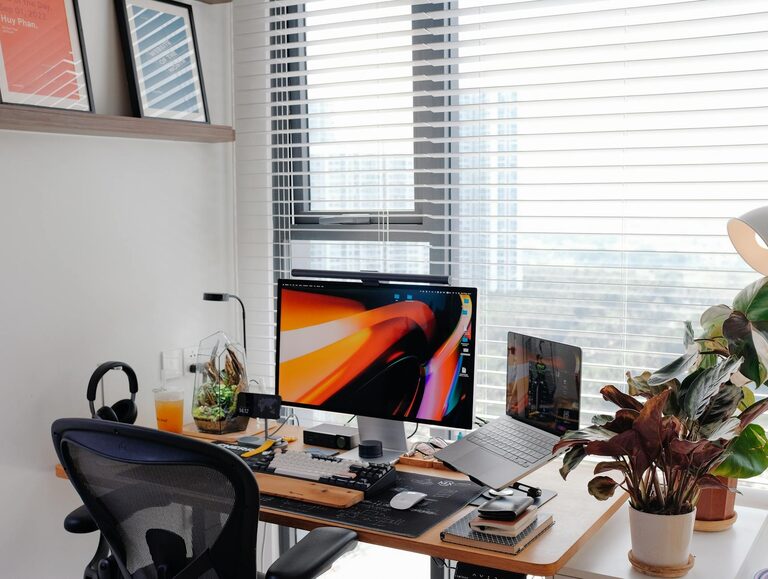
A bright, naturally lit room is beneficial for both mood and alertness. Try to position your desk near a window to take advantage of sunlight during the day. Natural light helps reduce eye strain and boosts energy.
Minimise Distractions
Look for a quiet corner or spare room where you can work without interruptions from other household members, pets, or noise. If this isn’t possible, some noise-cancelling headphones might be a useful investment.
Separate Work and Leisure Areas
Whenever possible, keep your workspace separate from your relaxation areas. This physical boundary helps your brain associate the space with work, making it easier to focus during work hours.
2. Invest in Functional Furniture
A Comfortable Chair
Spending long hours seated means an ergonomic chair is a must. Look for one that supports your back properly and promotes good posture to prevent discomfort or injury.
A Suitable Desk
Choose a desk that fits your space and meets your work needs. Whether you prefer a traditional desk or a standing desk option, ensure there’s enough surface area for your computer, documents, and other essentials.
Organised Storage
Declutter your work surfaces with cupboards, shelves, or filing cabinets. Having everything organised will reduce stress and make it easier to find what you need quickly.
3. Set Up Efficient Technology
Reliable Internet
A strong and stable internet connection is crucial for remote work, video calls, and uploading or downloading files. If your connection is slow, consider upgrading or using a wired connection.
Quality Devices
Ensure your computer, keyboard, mouse, and any additional devices like printers or scanners are reliable and in good working order. Comfortable peripherals can significantly improve your productivity.
Cable Management
Tidy cables reduce clutter and hazards and make your workspace look cleaner. Use clips, ties, or cable organisers to keep wires neat.
4. Optimise Lighting
Balance Artificial and Natural Light
While natural light is ideal, you’ll likely need desk lamps or ceiling lights for darker mornings or evenings. Choose lighting that reduces glare on your screen and prevents shadows.
Use Adjustable Lighting
A desk lamp with adjustable brightness or direction can help you tailor the lighting to your current task, whether reading, writing, or working on your computer.
5. Personalise and Make It Comfortable
Add Greenery
Plants not only beautify a workspace but also improve air quality and contribute to a calming atmosphere. Choose low-maintenance plants like succulents or spider plants if you don’t have a green thumb.
Keep Essentials Close
Organise your workspace so that frequently used items – pens, notebooks, chargers – are within arm’s reach. This reduces interruptions caused by searching for things.
Maintain Comfort
The temperature and ventilation in your workspace should be comfortable. A fan, heater, or window that opens will help regulate this. Adding a cushion or footrest can also enhance comfort.
6. Establish Boundaries and Routines
Set Working Hours
Defining clear start and finish times helps maintain work-life balance. Trying to ‘switch off’ is easier when your work has a defined schedule.
Designate Break Times
Regular breaks increase productivity. Use a timer or follow techniques like the Pomodoro method (25 minutes work, 5 minutes break) to stay refreshed.
Clear ‘Start’ and ‘End’ Rituals
This could be something simple like tidying your desk at the end of each day or making a to-do list first thing in the morning, signaling the beginning and end of your work period.
7. Keep the Space Neat and Organised
Daily Tidying
Make it a habit to spend 5–10 minutes at the end of each workday clearing your desk. A tidy space reduces stress and makes it easier to get started the next day.
Regular Decluttering
Periodically assess your workspace and remove unnecessary items or papers. Use digital tools to reduce paper clutter where possible.
Use Organisers and Labels
Desk trays, drawer organisers, and labelled folders can keep paperwork and supplies ordered, saving you time hunting for things.
8. Maintain Good Air Quality and Ambience
Ventilate Regularly
Open windows to let fresh air circulate, particularly during long working hours. Good ventilation improves concentration and helps prevent fatigue.
Consider Background Noise
Some people focus better with a little ambient sound—try gentle music or white noise apps if silence is distracting.
Pleasant Scents
A subtle, pleasant scent from a diffuser or candle can enhance mood and comfort. Avoid overpowering fragrances which might become distracting.
—
By thoughtfully designing your home office environment with these tips, you create a space that encourages concentration and well-being. Remember, the goal is to find a setup that feels comfortable and suits your unique working style. With the right environment, your home office becomes more than just a place to work—it becomes a space where your productivity and creativity can truly flourish.